Bring Korean pages or a chapter archive
Choose JPG, PNG or WebP images, a PDF, or one ZIP or CBZ archive. Select an archive on its own. A chapter can contain up to 300 pages and 50 MB.
Select your own manhwa images, PDF or chapter archive, review the page count and quote, then translate into English.
English output · Japanese or Korean detected automatically · 1 credit per page
Real translation example
Compare this Solo Leveling panel with its English result. Look at the two speech bubbles and the color artwork around them. This is a cropped example, not evidence that every long chapter or handwritten effect will translate the same way.
Drag the divider to compare the original and English lettering.
Solo Leveling ch.1 p.28 · D&C Media / Kakao Webtoon · MangaFluent translation preview.
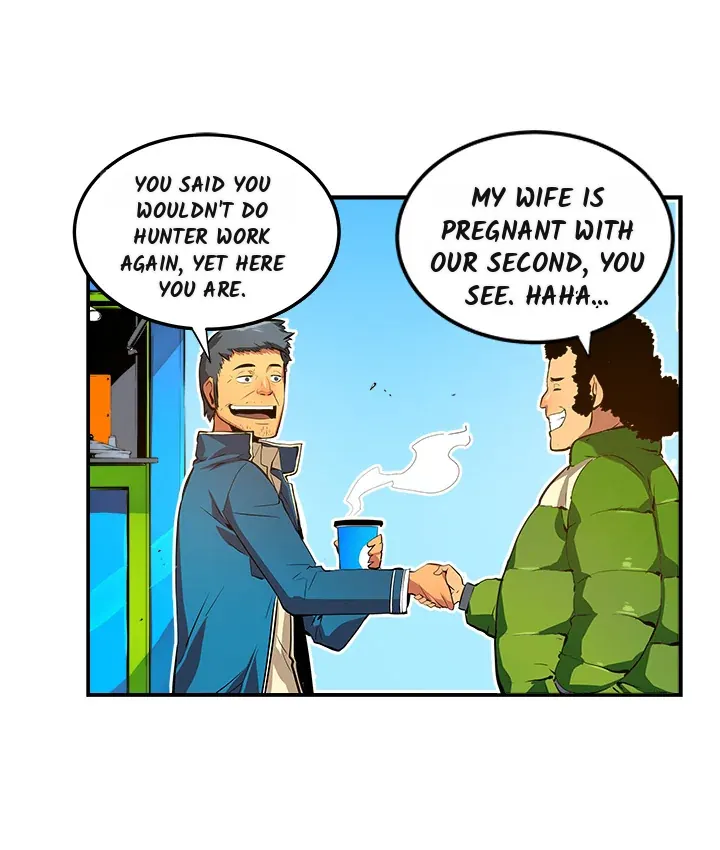
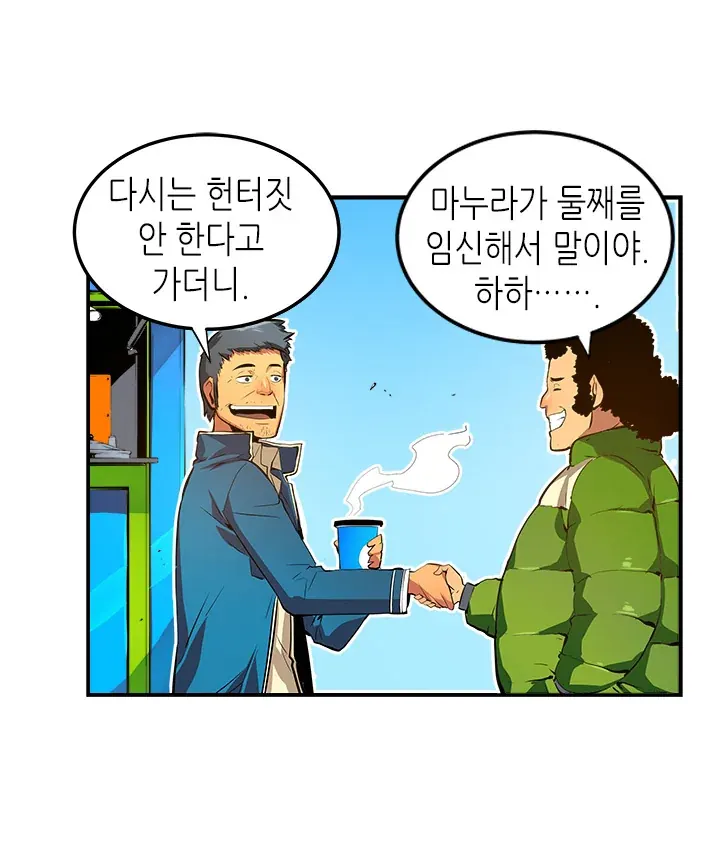
A small file can still be too tall to process. The uploader checks both total pixels and the number of detector segments. Reducing JPEG file size alone will not fix a strip that exceeds either limit. MangaFluent does not automatically split your upload into shorter images.
A CBZ is a ZIP archive of page images. Supported image entries are sorted naturally by filename: page2 comes before page10. Folder names are part of the paths, so inconsistent folders can still put a chapter in an unexpected order.
Choose a first page with readable Korean dialogue so automatic source detection has useful text. A logo-only cover is a poor first sample. In the finished reader, check names across panels, bubble text and effects drawn over colorful backgrounds.
This guide helps you prepare and review files. Translation uses the same homepage uploader, with the same limits and one-credit-per-page pricing.
| Your task | Use this guide to | Use the homepage tool to |
|---|---|---|
| Long Korean strips | Plan panel-safe cuts and check the cost of each piece. | Select the prepared images and review processing warnings. |
| Archived chapters | Check folder names, duplicate pages and chapter order. | Inspect one ZIP/CBZ and show its page count and credit quote. |
| English results | Use the Korean example to decide what to inspect. | Translate your own files, open the reader and export ready pages. |
Choose JPG, PNG or WebP images, a PDF, or one ZIP or CBZ archive. Select an archive on its own. A chapter can contain up to 300 pages and 50 MB.
Preview selected images and PDF pages locally before upload. Read finished pages in the job reader and export available results as CBZ, ZIP or PDF.
Yes. PDF pages are converted on your device and their image previews can be opened in the local reader.
No. Select a ZIP or CBZ archive on its own. You can select supported images or PDF pages separately.
Yes, within the image processing limits. If a strip exceeds the pixel or detector segment limit, split it between panels before selecting it. MangaFluent does not split uploads automatically. Each resulting physical page costs one credit, and the quote shows the total before translation.
Korean or Japanese is detected from the first page. Start with readable Hangul rather than a text-free cover, then review character names and dialogue in the finished reader. Handwritten and stylized text can be missed.