MangaFluent home

Translate Manga to English

Upload a Japanese manga chapter as images, a PDF, a ZIP or a CBZ archive. Check the page count and credit quote, then read the English pages as they finish. Japanese and Korean are detected from the first page; English is the output.

Choose files to translate

English output · Japanese or Korean detected automatically · 1 credit per page

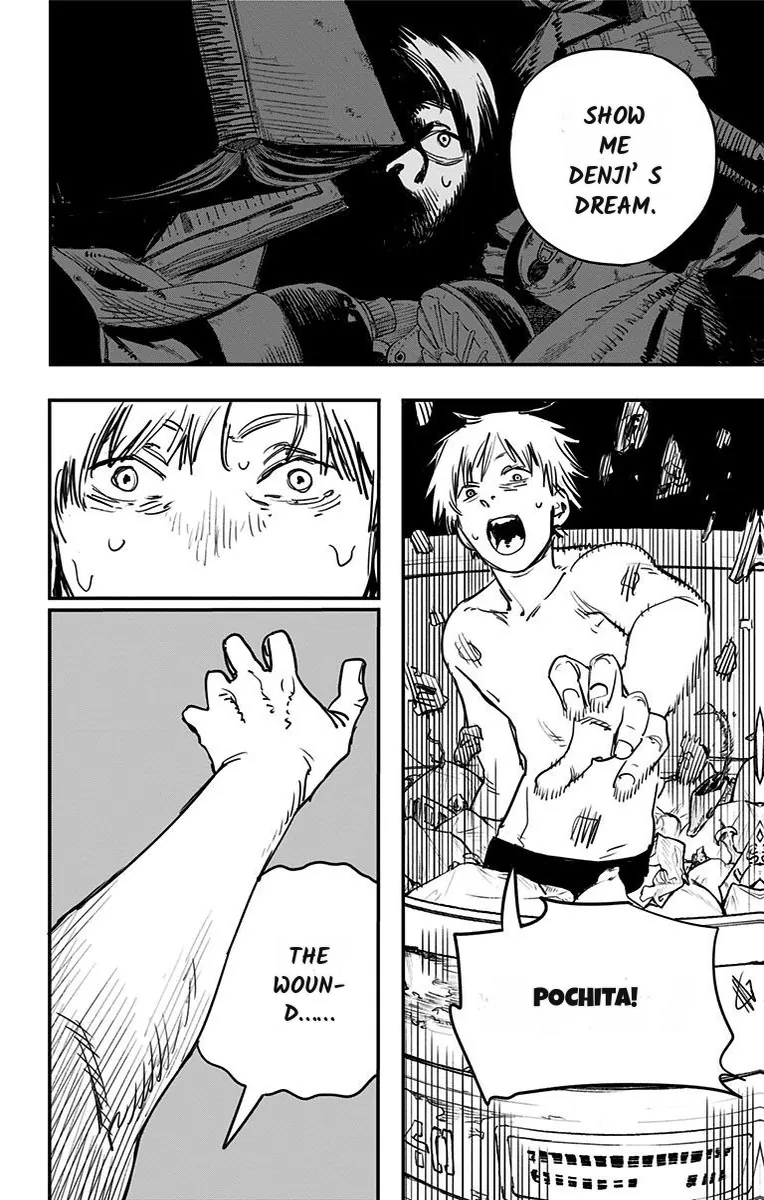
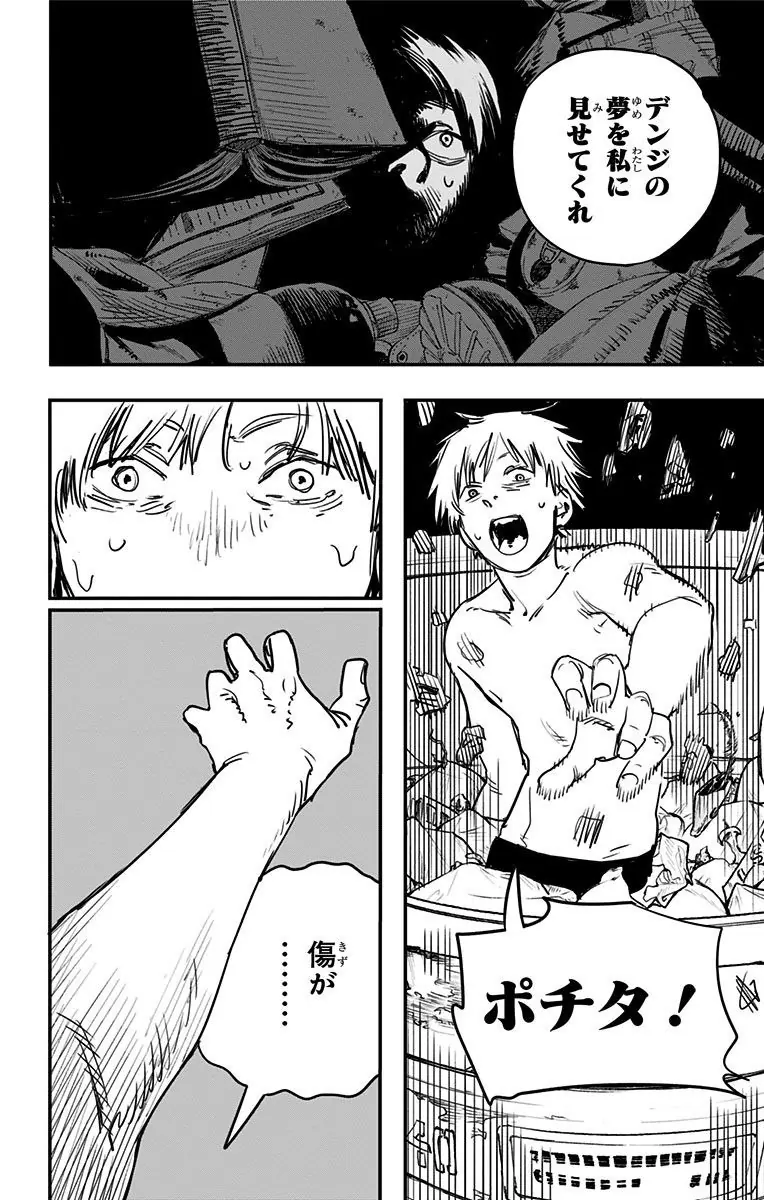
Real translation example

A Japanese manga page translated into English

This Chainsaw Man page shows dialogue and large display lettering in the original artwork and in the translated result. Compare placement as well as wording. The redrawn lettering in this example is a result to inspect, not a promise that every sound effect will be detected.

Drag the divider to compare the original and English lettering.

Chainsaw Man ch.1 p.36 · Shueisha / Shōnen Jump+ · MangaFluent translation preview.

The same Chainsaw Man page with English lettering placed back into the artworkOriginal Japanese Chainsaw Man page with speech bubbles and Pochita lettering
OriginalEnglish

How to translate manga to English

Select your chapter on the home page, check the page count and credit quote, then press Translate. Pages appear in the reader as they finish, and ready pages can be exported as CBZ, ZIP or PDF. Nothing uploads until you confirm the quote.

  • Start with a chapter whose first page has readable Japanese dialogue. Source-language detection uses the first page.
  • Check the quote before uploading. Each physical page costs one credit, regardless of image size.
  • Only upload content you have the right to translate.

Read Japanese dialogue in its panel context

Short Japanese lines can omit the speaker, subject or object. A name or an honorific can be ambiguous on one page and clearer in the surrounding scene. MangaFluent uses the page artwork and a chapter glossary to help keep terms consistent; a glossary does not remove the need to review ambiguous dialogue.

  • Start with a page containing readable Japanese text rather than a text-free cover, because source-language detection uses the first page.
  • For names that recur, compare their English spelling across the finished pages. Check a line against the neighboring panels when the speaker is unclear.
  • English text is placed back into the existing artwork. Translation does not mirror panels or redesign the original reading order.

Understand what happens to a manga PDF

PDF import renders each page to a JPEG in your browser before upload. The original PDF remains on your device; the generated page images upload when you press Translate. This produces translated page artwork, not an editable PDF text layer or a prose transcript of the chapter.

  • Wait for local conversion to finish, then open the page previews. Large PDFs need browser memory and time even before a translation starts.
  • Check small furigana and thin strokes in the preview. Rasterization cannot restore detail missing from a low-resolution scan.
  • A two-page spread stored as one image stays one image. Split it yourself before selection if you want separate pages; each resulting page costs one credit.

Review dialogue, sound effects and the final export

Speech bubbles, vertical text and lettering drawn into the background are different detection challenges. A clear bubble can translate well while a nearby handwritten effect remains Japanese. Check both the words and whether the replacement text fits its space.

  • Keep the full page when possible so the scene is visible. Cropping tightly around a line removes artwork that can help explain it.
  • Read available results in the job reader before downloading. CBZ, ZIP and PDF exports contain the translated pages that are ready.

Japanese reading advice and the translation tool

This guide helps you prepare and review files. Translation uses the same homepage uploader, with the same limits and one-credit-per-page pricing.

What this guide explains and what the homepage tool does
Your taskUse this guide toUse the homepage tool to
Context and namesKnow where omitted subjects, names and effects need a closer check.Detect Japanese or Korean and translate detected text into English.
PDF sourceUnderstand rasterization, preview quality and spreads.Convert pages locally and show a quote before upload.
Reading a chapterUse the Japanese example as a layout reference.Read your translated pages and export the available results.

Which manga files you can translate to English

Add JPG, PNG or WebP images, a PDF, or one ZIP or CBZ archive containing supported images. Select an archive on its own. A chapter can contain up to 300 pages and 50 MB, with each page up to 20 MB and about 25 megapixels. PDF pages are converted to images in your browser, so the original PDF stays on your device.

What gets translated — and what stays Japanese

The detector finds text regions, clears the lettering and places English back into the artwork. Speech bubbles, vertical text and lettering drawn over backgrounds are different challenges. Large, handwritten or highly stylized sound effects can be missed and remain in Japanese. Low-resolution scans cannot be restored by the translator.

How much it costs to translate a chapter

Each physical page costs one credit, regardless of image size. You can try 5 free credits without an account, and your first Google sign-in adds 30 bonus credits. Paid packs start at $4.99 for 1,000 credits, with no subscription. The exact page count and total are shown before anything uploads.

What happens to your uploads

Page images, reader text and results are retained for 24 hours after the latest run finishes, then queued for deletion. Another run resets the window. Page content may be sent through OpenRouter to model providers for processing; provider-side retention follows their own policies. See the privacy policy for details.

Japanese and Korean source pages

Japanese and Korean are both supported source languages, and English is the output. Detection uses the first page, so a chapter that opens on a text-free cover or color spread can be misread. Start with a page that has readable dialogue. A chapter glossary helps keep recurring names and honorifics consistent, but short lines that omit the speaker still need a human check against the neighboring panels.

Checking the English pages before you export

When you translate manga to English, read the finished pages in the job reader before downloading. Compare each speech bubble with the source, check whether the wording fits the space, and look at small text near the edges of cleared regions. Exports as CBZ, ZIP or PDF contain only the pages that finished successfully, so a partial run can produce a shorter chapter than you uploaded.

Questions about Japanese pages and English output

Can I translate manga to English for free?

Yes, within limits. You can try 5 free credits without an account, enough for up to 5 pages. Your first Google sign-in adds 30 bonus credits. This is a limited trial, not unlimited free translation, and usage limits apply.

Which file types can I upload?

JPG, PNG and WebP images, a PDF, or one ZIP or CBZ archive containing supported images. Select an archive on its own rather than mixing it with loose images or a PDF.

How many pages can one chapter have?

Up to 300 pages and 50 MB per chapter. Each page can be up to 20 MB and about 25 megapixels; very tall strips can exceed the detector limit. A two-page spread stored as one image counts as one page unless you split it yourself.

Does it translate Korean manhwa as well?

Yes. Japanese and Korean are both supported source languages, and English is the output. Detection uses the first page, so start with readable dialogue rather than a text-free cover.

Will it translate handwritten sound effects?

Only text regions the detector finds. Large, handwritten or highly stylized effects can be missed and remain in the original language. Review each page in the reader before exporting.

Can I download the translated manga?

Yes. The job page offers CBZ for compatible comic readers, ZIP for page images, and PDF assembled in your browser. If only some pages finish successfully, an export may contain fewer pages than the original chapter.

How long do you keep my uploads?

Page images, reader text and results are retained for 24 hours after the latest run finishes, then queued for deletion. Another run resets the window, and cleanup backlogs or failures can delay removal. Basic job-history and billing records remain.

How much does it cost?

One credit per physical page, regardless of image size. Packs start at $4.99 for 1,000 credits and remain valid while your account is active. The quote shows the total before translation.

Is there a browser extension?

Not currently. MangaFluent works with files selected from your device — images, PDF, ZIP or CBZ. A browser extension, APK and website URL import are not available.

Does it keep character names consistent?

A chapter glossary helps keep recurring names and terms consistent across pages. Ambiguous dialogue may still need a human check against the surrounding panels.
See pricing · Compare example pages · Privacy policy

Related translation guides